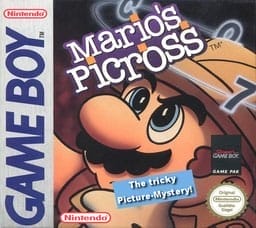
Mario's Picross
Play Now
Important Control Tip: If keys are unresponsive after the game loads, please [click on the game window] to activate input focus.
How to Play
How to Play
Press Play Now button to start the Game Boy Color emulator in your browser.
Control guide merged: use keyboard on PC and on-screen buttons on mobile.
🖥️ PC Controls
| Action | Key (Default) | Description |
|---|---|---|
| D-Pad | ↑↓←→ | Movement control |
| A Button | Z | Confirm / Attack |
| B Button | X | Cancel / Jump |
| Select | V | Select button |
| Start | Enter | Start button |
📱 Mobile Controls
- Movement
- D-pad (left side)
- Action Buttons
- A/B or X/Y/A/B (right side, varies by platform)
- Start / Select
- Center of screen
- Left-Handed Mode
- Swap layout in Control Settings
Mobile Controls: After starting the game, tap the menu in the top-right corner → "Control Settings" to view full key mappings and customize controls.
From Wikipedia, the free encyclopedia:
Source: Wikipedia
About This Game
History
Mario's Picross was developed by Jupiter and Ape and was published worldwide by Nintendo. The game was created in an effort to capitalize on the popularity of puzzle games in Japan. Jupiter would go on to become the developer for the majority of the games in the Picross video game franchise. The game was released in Japan for the Game Boy on March 14, 1995. It was also re-released on the Nintendo 3DSVirtual Console in 2011 on 14 July in Europe, and in August for North America and Japan. Upon the game's release, despite Nintendo's marketing through television commercials and Nintendo Power magazine, the game did not meet the market trends of English-speaking regions and failed there. The game, however, proved to be popular in Japan.
More details about this game can be found on Wikipedia article .
Comments
Log in to leave a comment.
Sign InNo comments yet. Be the first!
Related Games

Tetris
Magic Jewelry
Brain Age: Train Your Brain in Minutes a Day!
Columns
Blockout