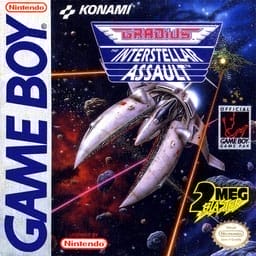
Gradius: The Interstellar Assault
Play Now
Important Control Tip: If keys are unresponsive after the game loads, please [click on the game window] to activate input focus.
How to Play
How to Play
Press Play Now button to start the Game Boy Color emulator in your browser.
Control guide merged: use keyboard on PC and on-screen buttons on mobile.
🖥️ PC Controls
| Action | Key (Default) | Description |
|---|---|---|
| D-Pad | ↑↓←→ | Movement control |
| A Button | Z | Confirm / Attack |
| B Button | X | Cancel / Jump |
| Select | V | Select button |
| Start | Enter | Start button |
📱 Mobile Controls
- Movement
- D-pad (left side)
- Action Buttons
- A/B or X/Y/A/B (right side, varies by platform)
- Start / Select
- Center of screen
- Left-Handed Mode
- Swap layout in Control Settings
Mobile Controls: After starting the game, tap the menu in the top-right corner → "Control Settings" to view full key mappings and customize controls.
From Wikipedia, the free encyclopedia:
Source: Wikipedia
About This Game
Gameplay
Gradius: The Interstellar Assault retains the traditional horizontal scrolling gameplay from the Gradius series. Once again the player takes control of the Vic Viper and flies through five different stages destroying Bacterion's army. The game retains the traditional power-up bar from the original Gradius. The player can speed-up multiple times, use missiles, shoot double firepower or lasers, use several options at a time and use the classic shield (although it is referred to as a forcefield). However, before each game is started or continued, the player is given a "Weapon Select" screen. Here the player can choose between one of three settings for the missiles, double firepower, and lasers.
More details about this game can be found on Wikipedia article .
Comments
Log in to leave a comment.
Sign InNo comments yet. Be the first!
Related Games
TwinBee
Bomber Raid
Aleste

Panorama Cotton
Fantasy Zone II